Every Customer Inquiry. One High-Converting Platform.
Connect WhatsApp, Instagram DMs, and Facebook Messenger to a single AI-powered CRM. Reply instantly, auto-qualify buyers, and close more sales with zero manual chaos.
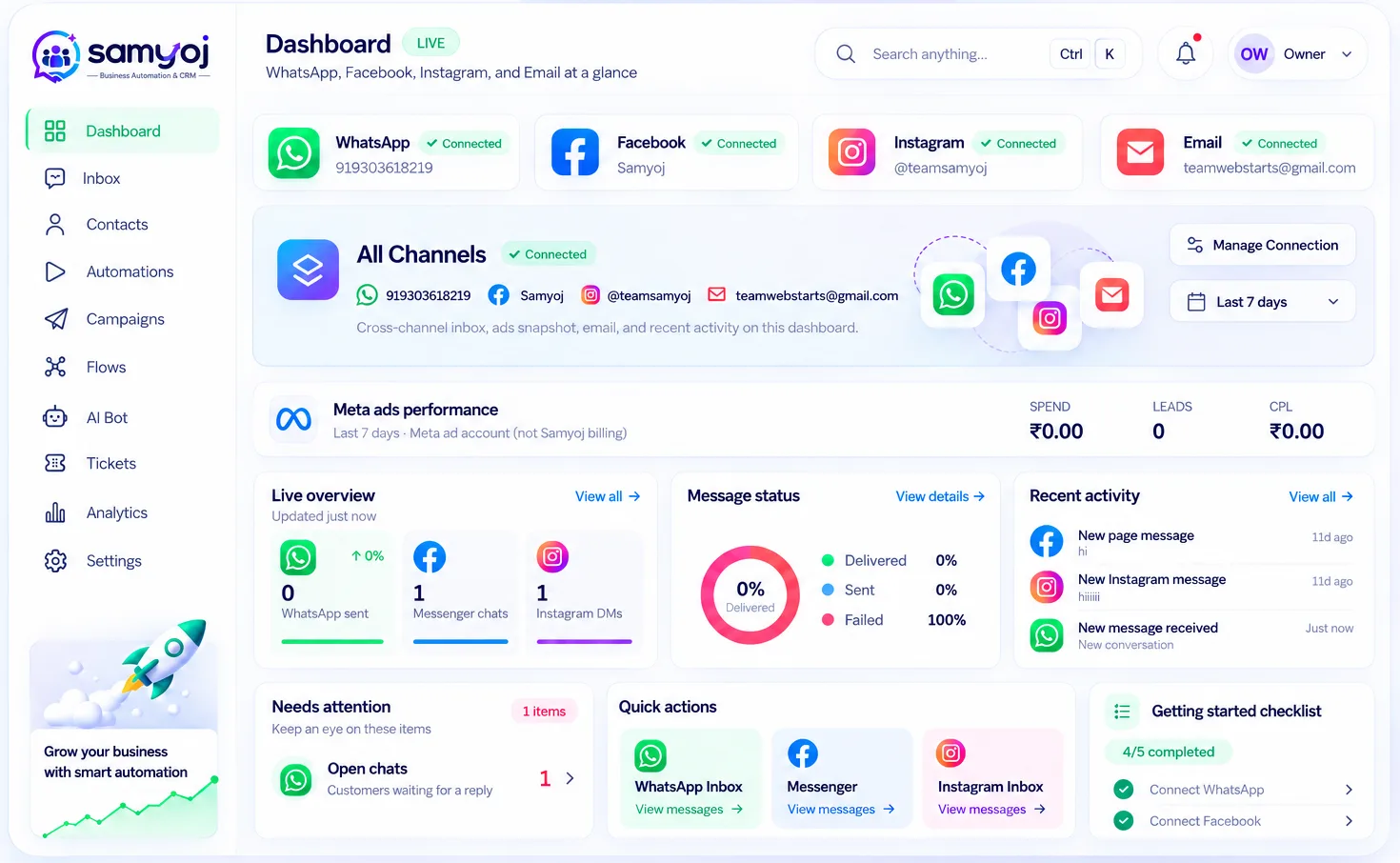
Instant multi-channel inbox for WhatsApp, Instagram & Facebook.
Business-trained AI agents that answer questions and qualify leads 24/7.
Automated follow-ups and broadcast campaigns with 90%+ open rates.
Seamless handoff to sales reps with complete chat and contact history.
Official Meta Cloud APIs for WhatsApp, Instagram & Facebook.
ONE PLATFORM. CONNECTED WORKFLOWS.
The Tools Behind Better Customer Conversations
Explore the tools that help your team manage communication, organize contacts, and work more efficiently with Samyoj.
All-in-One Team Inbox
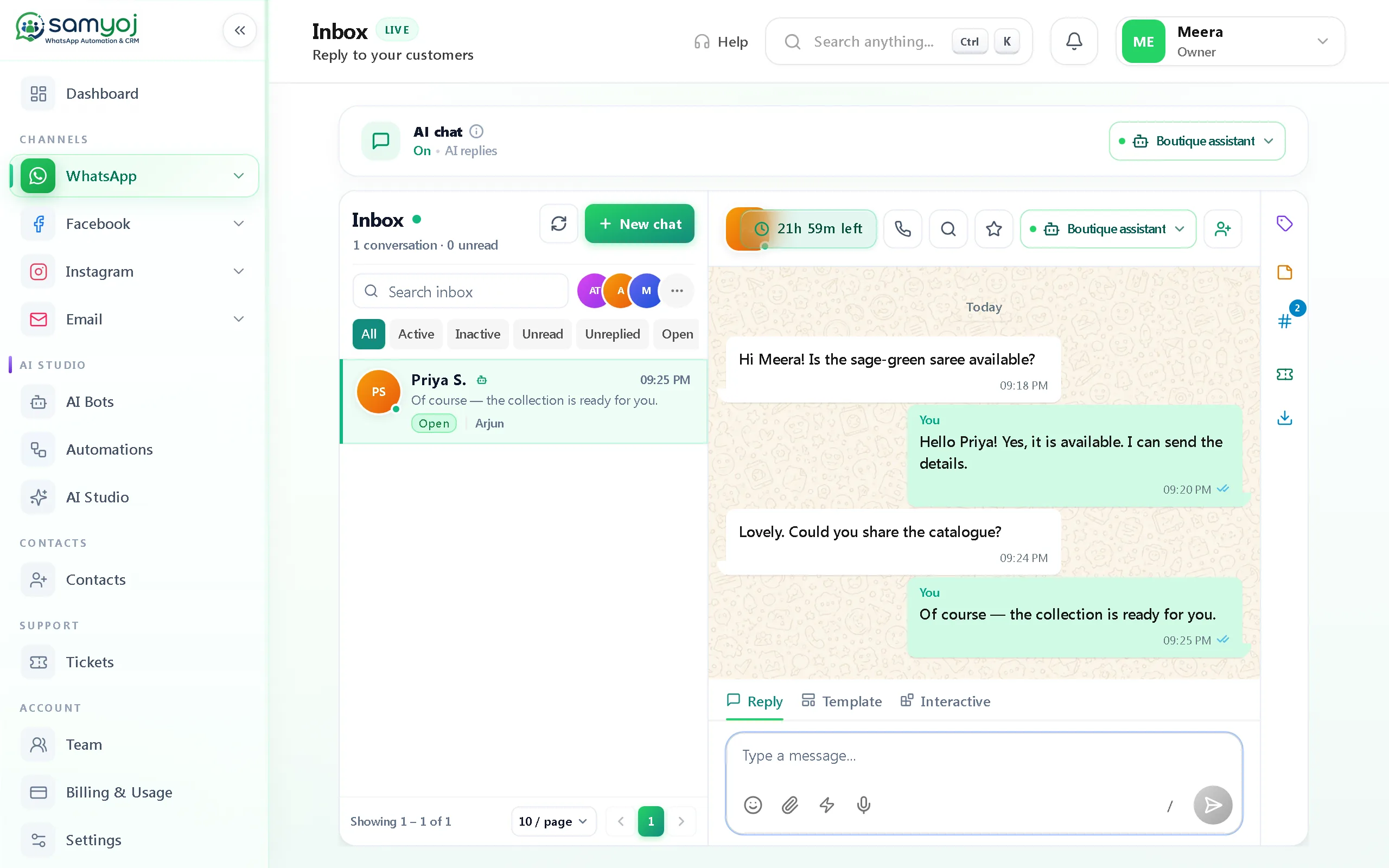
Handle WhatsApp, Instagram, and Facebook chats from one shared screen. Assign conversations to team members and never miss an incoming message.
Visual Workflow Automation
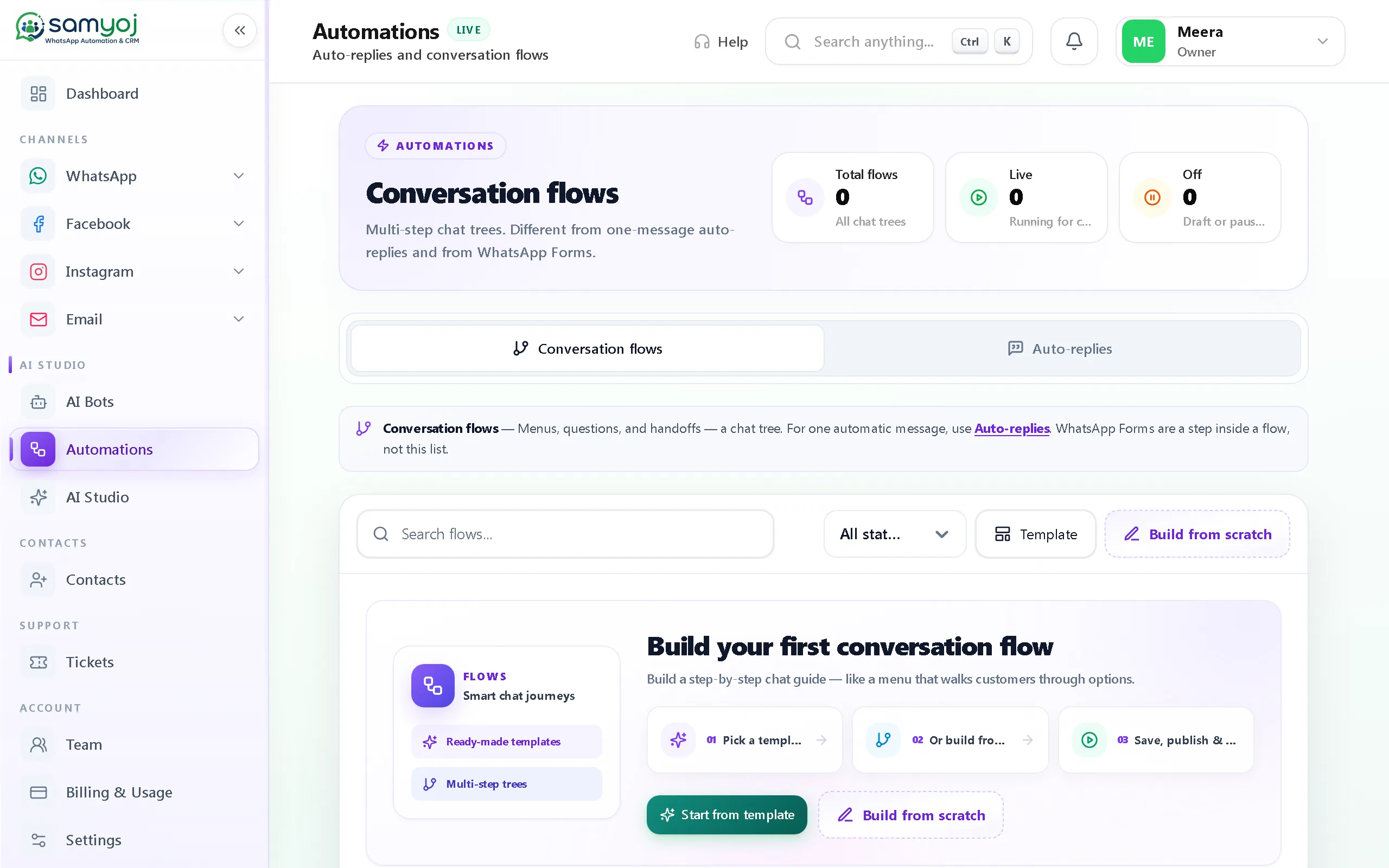
Build drag-and-drop chat flows that greet new inquiries, capture contact info, and route hot leads straight to your sales team.
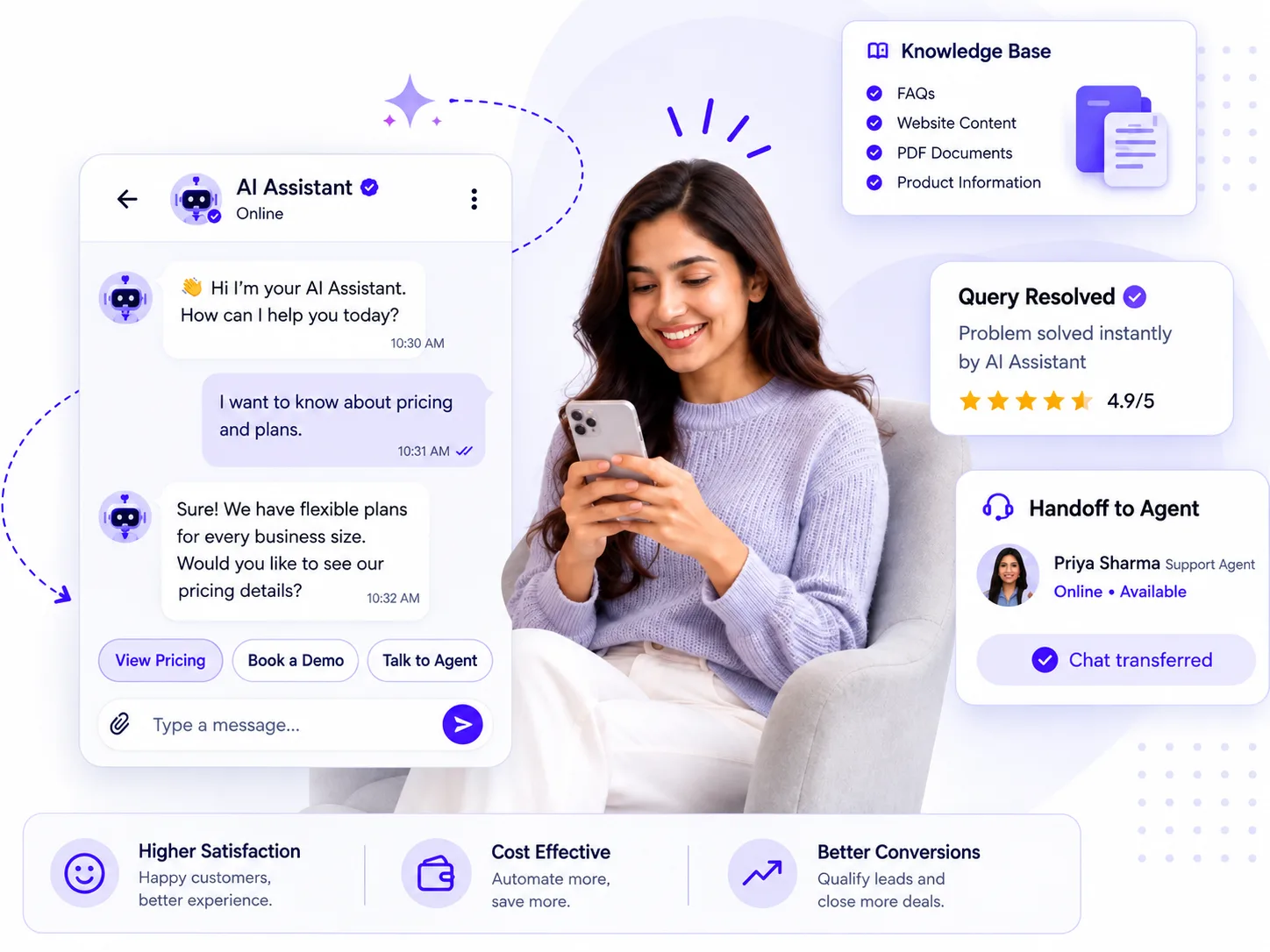
24/7 AI Sales Assistant
Train an AI agent on your products, pricing, and services. It answers customer questions naturally and books meetings while your team sleeps.
WhatsApp Broadcast Campaigns
Send targeted promotions, seasonal offers, and product launches directly to customer phones with verified high delivery and read rates.
Enterprise Grade Security
ISO 27001 • SOC 2 • GDPR Ready
24/7 Expert Support
Real humans. Real fast.
Smart Lead & Contact CRM
Track every lead's stage, purchase intent, and full chat history in one organized contact card so your team always knows who to follow up with.
In-Chat Issue Resolution
Convert customer queries into tracked tickets with priority tags, ensuring customer complaints and requests get resolved without delays.
Sales & Response Analytics
Monitor team response times, conversation volumes, and campaign ROI in real time to see exactly how fast your leads turn into customers.
Zero-Friction Integrations
Sync conversations and lead details directly with your favorite CRMs, Google Sheets, and calendar booking tools via webhooks and official APIs.
THE SAMYOJ WORKSPACE
A clearer view of every channel.
Choose a channel to explore its inbox, automation and tools. These are real Samyoj product screens captured with fictional demo data.
01 WHATSAPP INBOX
Keep WhatsApp conversations ready for a reply.
Connect a business number and keep its inbox, contacts and campaigns in their own workspace. Assign chats, leave notes, search conversations and use ready replies. Its saved history stays if you disconnect the number.
Share images, documents, audio and video in a chat
Send free-form replies within 24 hours; use an approved template after that
See when a conversation started from an ad click
Create templates, submit them to Meta for review, and use buttons, lists or a call-permission card
Set WhatsApp welcome, keyword, away and business-hours replies. Use the visual flow builder for messages, buttons, delays and handoff, then test the flow or jump to a step from the inbox.
Collect details with WhatsApp Forms inside a chat
Use a separate keyword rule for Instagram comments
After someone replies to an Instagram comment message, continue in the Instagram inbox
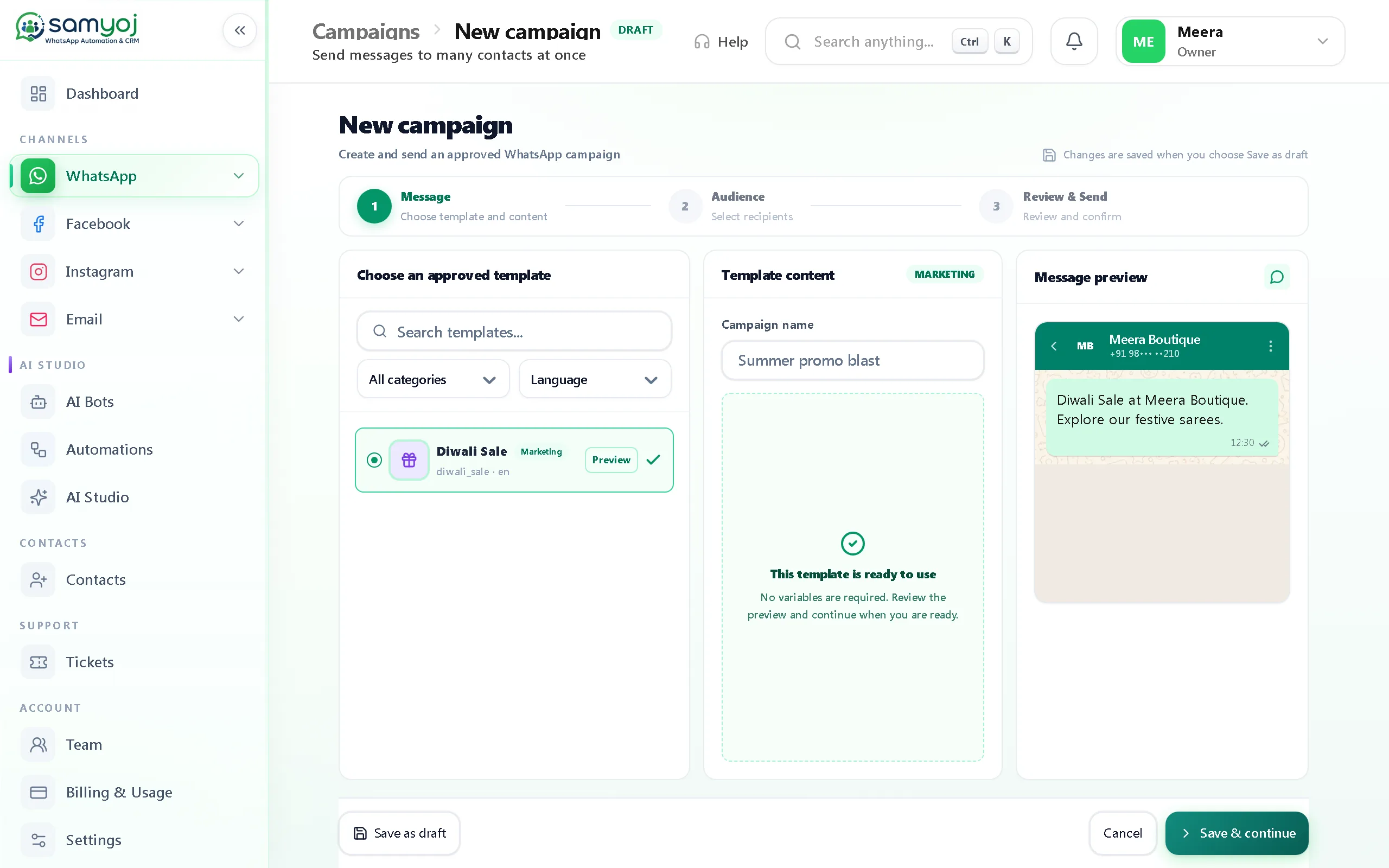
Choose an approved template and an audience from contacts, tags, a typed list or opted-in contacts. Fill in the template, then schedule or repeat a send.
Sending is blocked unless opt-in has a source and time, and the contact has not opted out
Retry failed sends and set a follow-up for people who do not reply
Review sent, delivered and read counts; pause, resume, reschedule or duplicate a campaign
Teach the chat assistant your business, then try it.
Set its personality and business details, add answers and FAQs, and test it before turning it on. The assistant can reply in the language a customer uses, including Hinglish.
Turn AI off for one conversation and reply yourself
Choose AI or human-only handling for a contact
Chat and calling assistants are configured separately
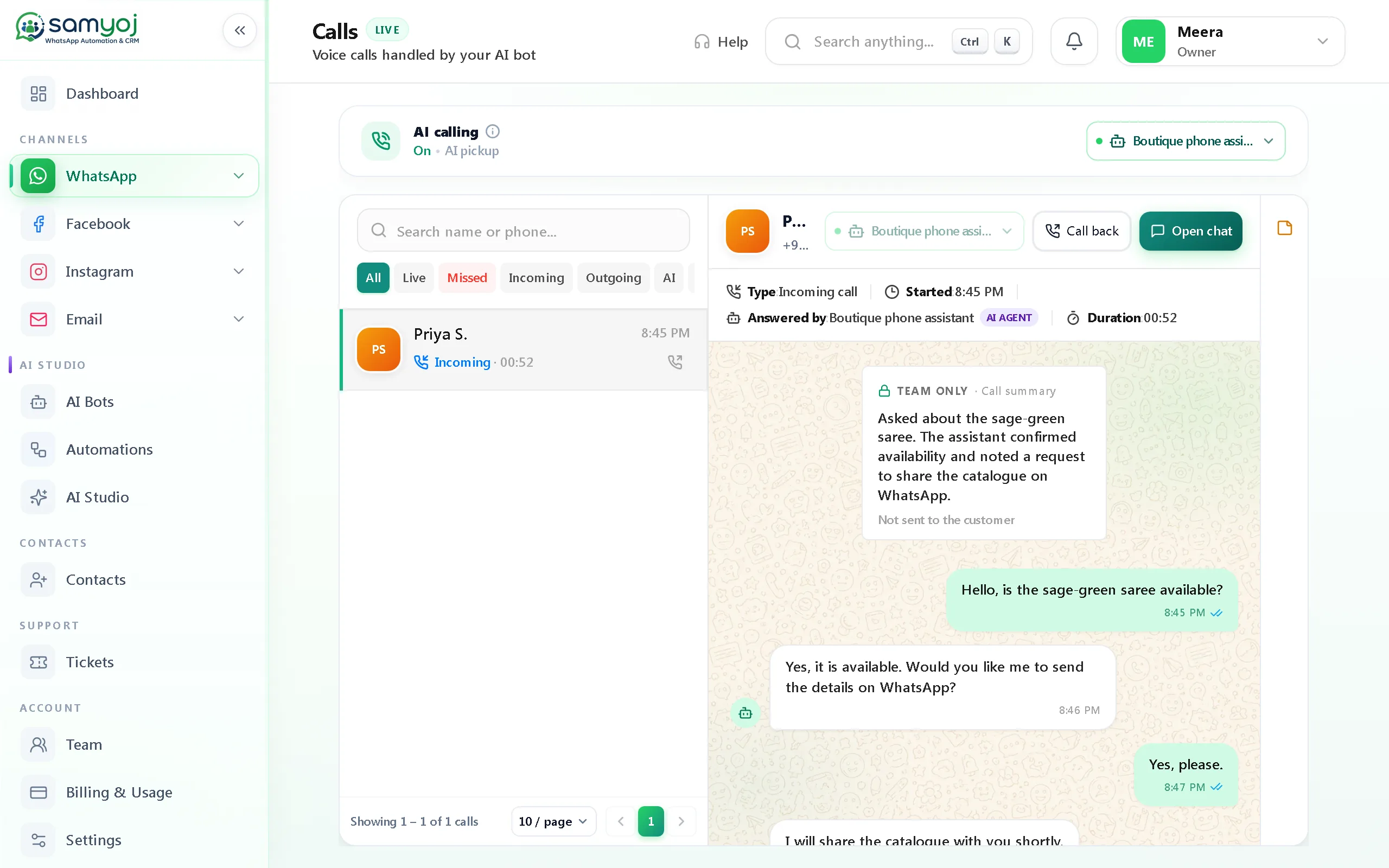
The separate calling assistant can answer WhatsApp calls. Choose a voice and preview it, set whether AI or a person handles a contact, then review the call summary in the chat.
Business-level off setting takes priority over contact settings
Call recents and summaries stay with the conversation
Live transfer from the AI call to a human is not available yet
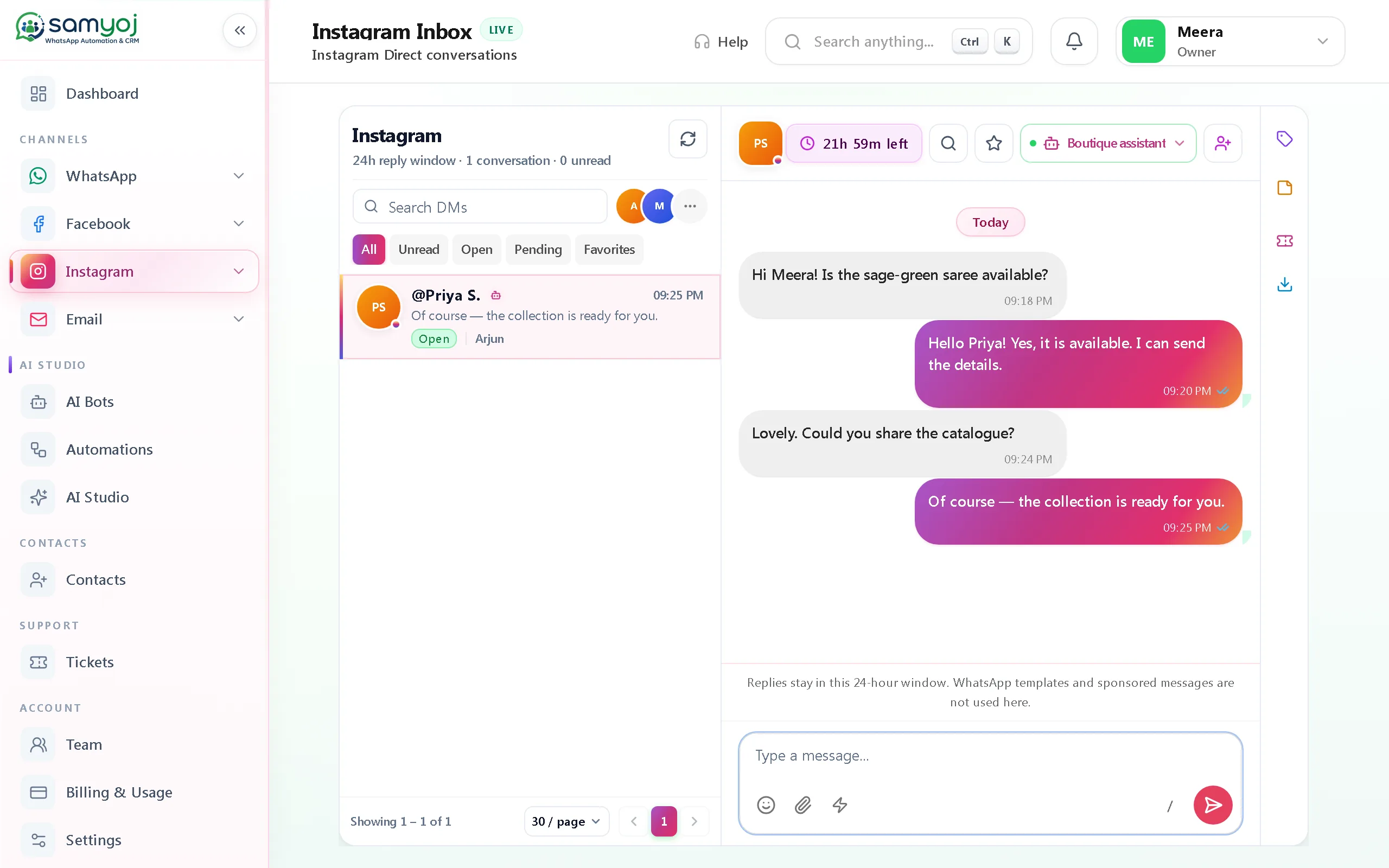
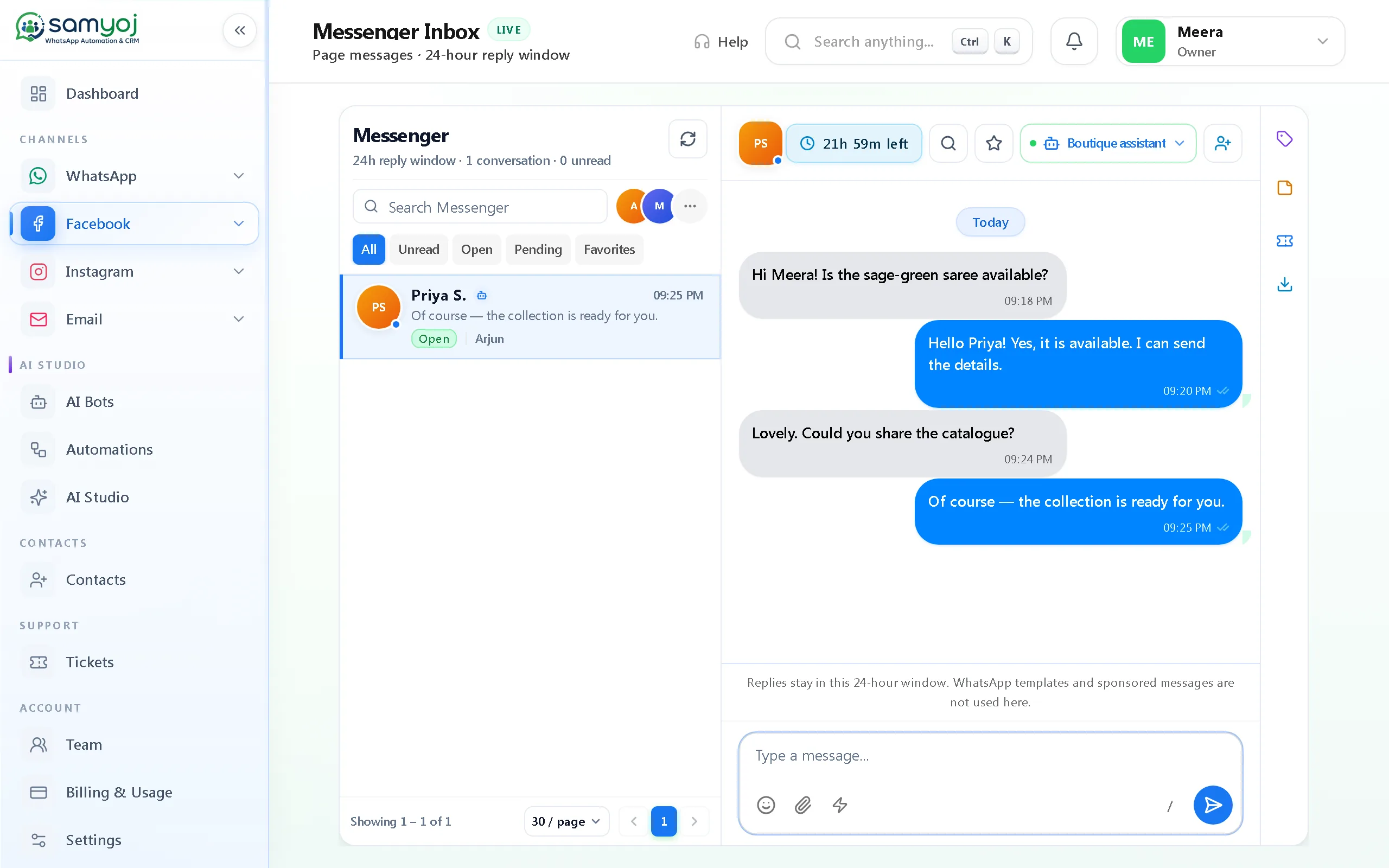
Connect a professional Instagram account linked to a Facebook Page. Read and reply to direct conversations from the Instagram inbox, within Instagram’s 24-hour reply window.
Instagram conversations remain separate from WhatsApp
When someone replies to a comment message, continue the conversation in DMs
Instagram requires a connected professional account and the linked Page
Handle comment replies with the right limits built in.
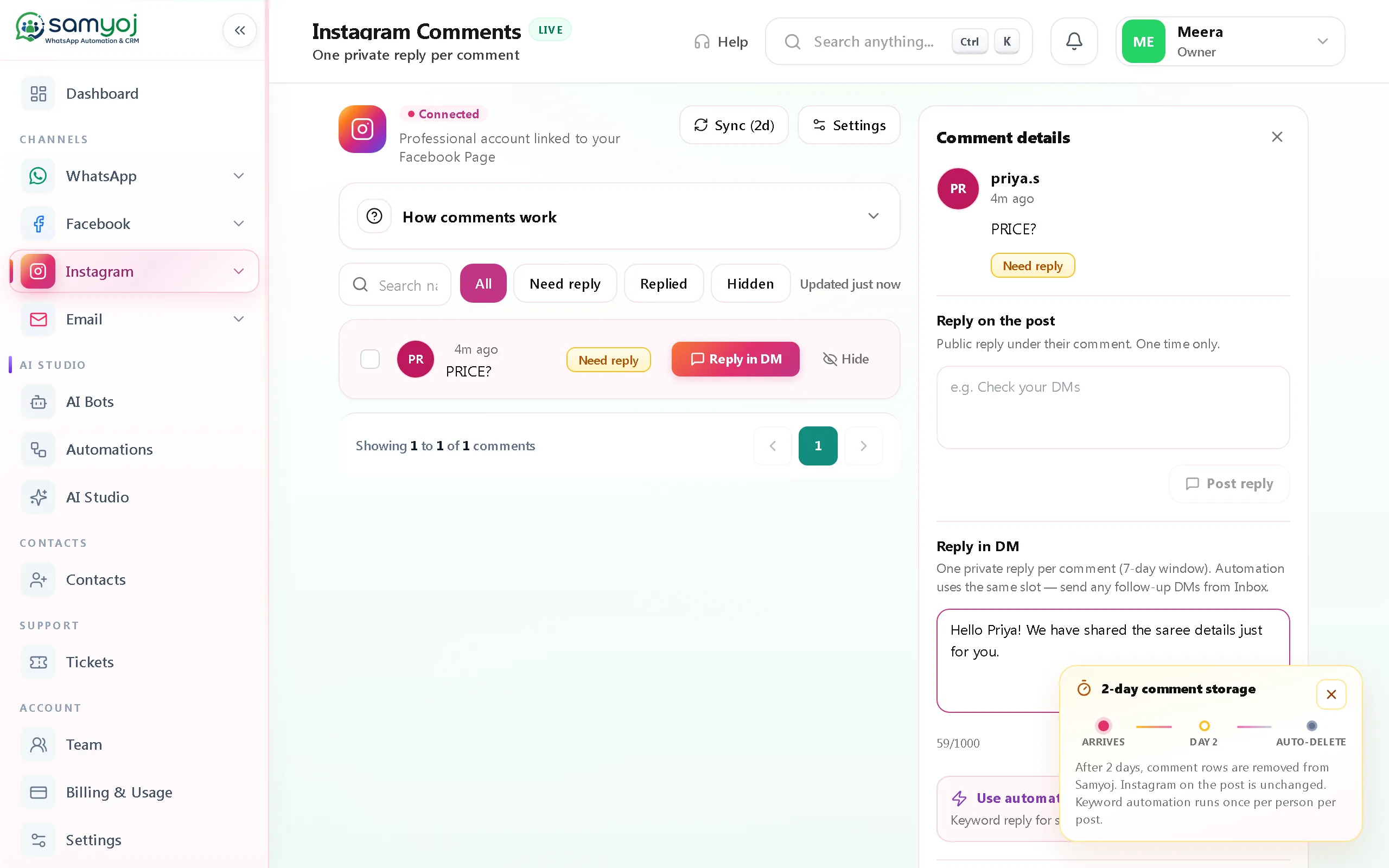
Review comments, hide or unhide them, and send one private reply per comment within Instagram’s seven-day window. A keyword rule can start that reply from a comment.
Comment keyword automation runs on Instagram comments only
After the person replies, continue in the Instagram inbox
Samyoj removes comment rows after two days; the original Instagram post and comment are unchanged
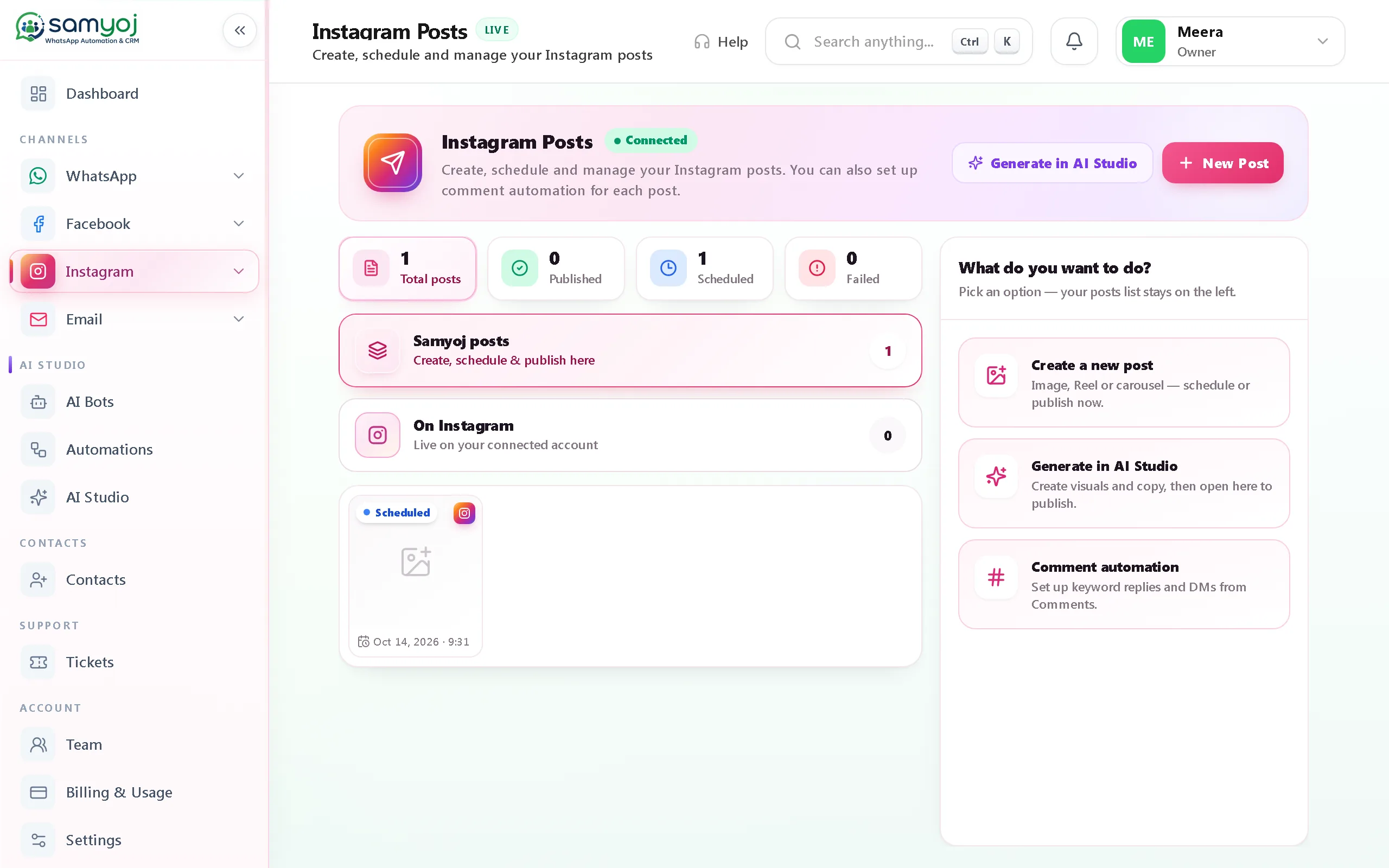
Prepare image, Reel or carousel posts in Samyoj. Save a draft, publish now, schedule it, cancel a scheduled post, and review scheduled or published posts.
Keep planned content and published posts in view
Stories editing is not included in the current publishing tools
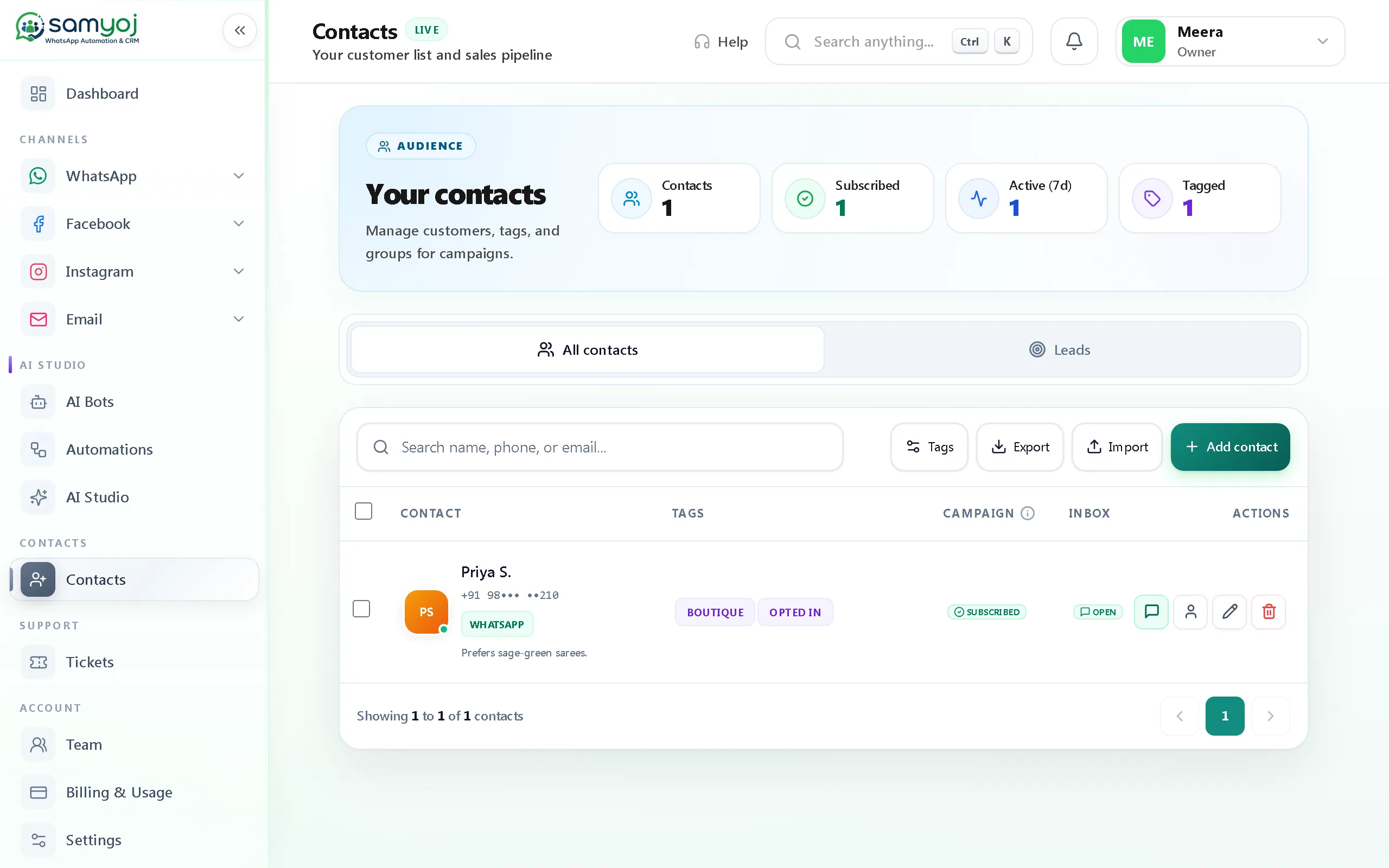
Search and filter contacts, organise them with tags, and keep WhatsApp campaign consent tied to its source and time. Facebook Instant Form submissions can be saved as leads.
Build WhatsApp campaign audiences from contacts, tags or opted-in people
Keep each connected WhatsApp number’s contacts in its own workspace
Save Facebook form submissions in the Samyoj lead list
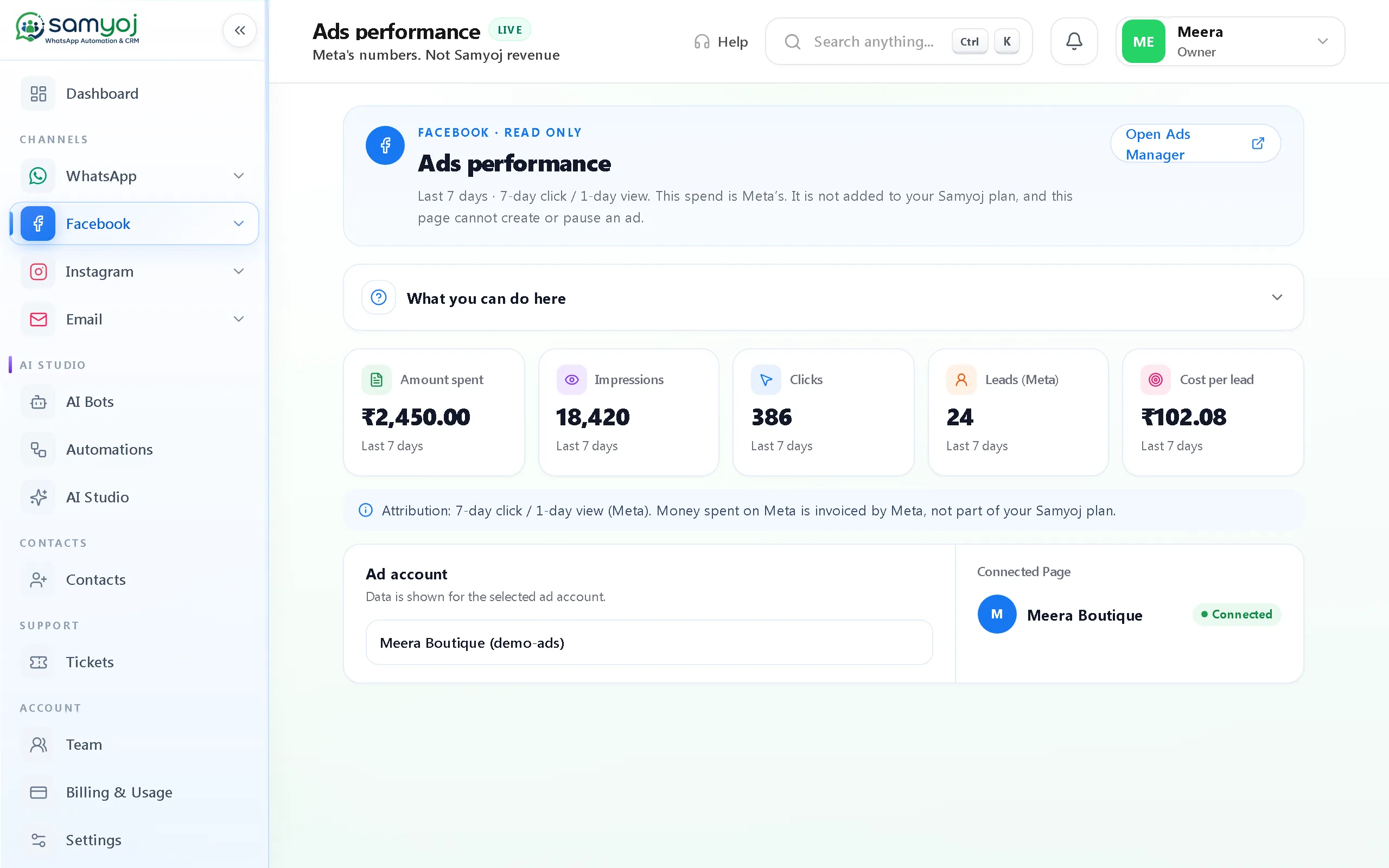
Review ad results in Samyoj. Edit them in Ads Manager.
Choose a connected ad account and review the last seven days: spend, impressions, clicks, leads and cost per lead, with the 7-day click / 1-day view attribution label.
Open Meta Ads Manager for campaign changes
Samyoj does not create, edit, pause or change ad budgets
Meta account access depends on required permissions and app approval
WhatsApp, Instagram DMs and Messenger each have a dedicated inbox in Samyoj. Assign conversations, add notes, search chats and reply with the right channel context.
Desktop product capture uses demo data. The phone card is an illustrative preview—not a mobile-app screenshot.
02 AUTOMATION
Let simple rules take care of repeat steps.
Set up WhatsApp welcome, away and keyword replies, or build a visual flow with messages, buttons, delays and a team handoff. Instagram comment keywords can start a separate reply flow.
Build and test WhatsApp conversation flows
Set business hours and away messages
Use keyword triggers for WhatsApp or Instagram comments
Desktop product capture uses demo data. The phone card is an illustrative preview—not a mobile-app screenshot.
03 AI ASSISTANTS
Set up AI, test it, and stay in control.
Configure chat and calling assistants separately with your business details and FAQs. Test answers before going live, switch AI off for an individual chat, and review a call summary in the conversation.
Choose what your chat assistant knows
Test responses before enabling the assistant
AI can answer WhatsApp calls; summaries stay in chat
Customer asked about product availability and next steps.
Internal note · Demo data
Review the summary in the chat.
Desktop product capture uses demo data. The phone card is an illustrative preview—not a mobile-app screenshot.
04 WHATSAPP CAMPAIGNS
Send campaigns with consent in the flow.
Choose an approved WhatsApp template and an audience of opted-in contacts. Schedule a send, follow delivery status, and retry failed messages—all with opt-out checks in place.
Use approved templates and saved contact groups
Sending is blocked for contacts without recorded opt-in
Desktop product capture uses demo data. The phone card is an illustrative preview—not a mobile-app screenshot.
05 CONTACTS & LEADS
Keep customer details easy to find.
Search and filter contacts, use tags, and keep consent details with the record. Facebook Instant Form submissions can be saved as leads in your workspace.
Desktop product capture uses demo data. The phone card is an illustrative preview—not a mobile-app screenshot.
06 INSTAGRAM
Plan Instagram content from the same workspace.
Prepare image, Reel and carousel posts as drafts, schedule or publish them, and cancel scheduled content when plans change. Instagram comments and DMs remain in their own channel workflows.
Draft, schedule, publish or cancel posts
Manage image, Reel and carousel formats
Handle eligible comment replies in Instagram’s allowed window
SDRAFT · CAROUSELNew season, new ideasPreview post · Demo data
Edit or schedule when your content is ready.
Desktop product capture uses demo data. The phone card is an illustrative preview—not a mobile-app screenshot.
07 META ADS INSIGHTS
See the numbers. Make changes in Ads Manager.
Connect an ad account to review the last seven days of spend, impressions, clicks, leads and cost per lead, with the attribution window shown alongside the results.
Desktop product capture uses demo data. The phone card is an illustrative preview—not a mobile-app screenshot.
Key Platform Benefits
Built to Support Your Team's Workflow
Practical tools and clear visibility designed to help your team manage conversations smoothly across channels.
Organized Communication
Work with the messaging channels connected to your account.
Simpler Workflows
Explore the automation capabilities available in Samyoj.
Customer Context
Use available contact information to support customer interactions.
Activity Visibility
Review the messaging and campaign metrics provided by the dashboard.
Room to Grow
Choose the available features and plan that suit your business.
Explore Samyoj Features
Find the tools that fit your team's communication and customer-management workflow.
Omnichannel Team Inbox
Consolidate WhatsApp, Instagram DMs, and Facebook Messenger into one shared inbox with labels, notes, and agent assignment. Your team stays aligned and responds faster without jumping between separate apps.
Design custom conversation trees for welcome messages, FAQ responses, and lead routing with a visual builder. Automating routine steps keeps first response times fast while freeing staff for complex queries.
Engage inbound prospects around the clock with an intelligent assistant that answers initial questions and collects key details. Sales reps can review the context and step in whenever high-intent buyers are ready.
Send targeted marketing announcements, updates, and newsletters to opted-in audiences using Meta-approved templates. Delivery and read tracking help your team measure audience interest and follow up effectively.
Organize customer profiles, contact details, custom tags, and full conversation records in one searchable database. Giving agents instant access to relationship history helps deliver personalized customer service.
Convert messaging threads directly into actionable support tickets with assigned owners, priorities, and statuses. Your team resolves customer issues methodically without losing original chat context.
Capture customer requirements, feedback, and intake information directly within messaging conversations. Gathering details within chat reduces form drop-offs and keeps customer interactions effortless.
Handle customer calls alongside chat conversations and escalate automated interactions to human agents when needed. Customers experience seamless transitions without having to repeat their inquiries.
Showcase products through messaging catalogs and manage related buyer inquiries directly within customer threads. Centralizing order discussions helps sales teams answer buyer questions promptly.
Track message delivery rates, read confirmations, and team response activity in real time. Operational visibility helps managers evaluate performance and optimize support workflows.
Assign specific access privileges and roles to team members across your workspace. Role-based controls protect customer data while enabling smooth collaboration across departments.
Connect external applications, databases, and CRMs using webhooks and developer APIs. Event-driven syncing keeps customer records updated across your existing business systems.
Operate on official Meta Cloud APIs designed for policy compliance, data integrity, and delivery reliability. Centralized consent and opt-in tools help protect customer privacy responsibly.
Draft marketing copy, message templates, and customer response suggestions with AI writing support. Content assistance accelerates drafting while preserving professional brand standards.
Set operational schedules, working days, and automated off-hours away messages. Clear response timing sets customer expectations and protects team boundaries.
Create localized message paths and templates to communicate with customers in their preferred languages. Addressing customers natively improves clarity and builds lasting trust.
Use Samyoj's available AI tools to support customer interactions and help your team handle common inquiries more efficiently.
AI-Powered Responses
Provide automated replies to common inquiries and FAQs to help customers get timely answers across active communication channels.
Knowledge-Based Assistance
Configure your AI assistant with your business information and FAQs so responses remain grounded in your verified documentation.
Human Handoff
Transfer complex conversations or sensitive customer inquiries smoothly to your team members with complete chat context preserved.
AI-Assisted Customer Communication
Support your agents with prompt drafting assistance and structured messaging templates to keep responses consistent and efficient.
Frequently Asked Questions
What features does Samyoj offer for omnichannel communication and lead automation? +
Samyoj connects WhatsApp, Instagram, Facebook Messenger, and Meta Ads into one AI-powered workspace. You get a unified team inbox, 24/7 AI lead qualification, visual automated follow-up sequences, multi-channel broadcast campaigns, smart CRM pipeline sync, in-chat forms, and live analytics.
Why do businesses lose leads across WhatsApp and Instagram without Samyoj? +
Most businesses miss inquiries because messages are scattered across separate apps, responses take hours, and follow-ups are manual. Samyoj automates the entire journey from first message to qualification, CRM sync, and multi-step follow-ups so zero leads fall through the cracks.
How does AI Lead Qualification work in Samyoj?
+
When an inquiry arrives from WhatsApp, Instagram, or an ad click, Samyoj's AI agent responds within 5 seconds, asks qualifying questions, captures requirements, and routes hot leads directly to sales agents or schedules consultations.
Can Samyoj automatically follow up with prospects who stop responding? +
Yes. Samyoj triggers automated multi-step follow-up sequences across WhatsApp or Instagram. These sequences deliver timely nudges, answer objections, and re-engage cold prospects.
Can I manage contacts, lead stages, and support tickets in Samyoj? +
Yes. Samyoj integrates contacts, tags, pipeline stages, and support tickets directly with the conversation history across all channels, giving your team full context without switching tools.
How does Samyoj integrate with Meta Ads (Click-to-WhatsApp & Instagram Direct)? +
Samyoj captures leads directly from Click-to-WhatsApp and Instagram Direct ads, triggering instant AI qualification flows with zero form drop-offs, cutting acquisition costs and maximizing ad ROI.
Is Samyoj built on official Meta APIs? +
Yes. Samyoj is a Meta Tech Provider on official Meta Cloud APIs for WhatsApp Business, Instagram, and Facebook Messenger. Message delivery runs on Meta’s infrastructure. Samyoj does not publish a separate uptime percentage.